The Superbox, a popular streaming device, has revolutionized how many access entertainment. Its intuitive interface and vast content library make it a compelling choice for cord-cutters and avid streamers alike. However, like any electronic device, the included remote control can sometimes fall short. Whether it’s lost, broken, or simply lacking certain functionalities, finding a suitable Superbox remote alternative is a common concern. This comprehensive guide will delve into the world of Superbox remote alternatives, exploring your options, their pros and cons, and how to make an informed decision.
Why Look for a Superbox Remote Alternative?
Before we dive into the alternatives, it’s crucial to understand the common pain points that lead users to seek replacements for their original Superbox remote. These can range from the mundane to the more significant:
- Durability Issues: Remote controls, especially those used frequently, are susceptible to wear and tear. Accidental drops, spilled drinks, or general age can render them useless.
- Lost in the Couch Abyss: The notorious “couch abyss” has claimed countless remote controls. Finding a replacement becomes a necessity when the original is irretrievably lost.
- Missing Features: The stock Superbox remote might lack advanced features that users desire, such as voice control, programmable buttons, or a more ergonomic design.
- Compatibility Concerns: While designed for the Superbox, some remotes might experience intermittent connectivity issues or a limited range.
- Cost of Replacement: Sometimes, purchasing an official replacement remote directly from the manufacturer can be surprisingly expensive.
- Desire for an “All-in-One” Solution: Many users wish to consolidate their remotes, controlling their TV, soundbar, and streaming device with a single unit.
Understanding Your Options: A Categorized Approach

The market offers a diverse range of Superbox remote alternatives, each with its own set of features and benefits. We can broadly categorize these into the following:
1. Universal Remote Controls

Universal remotes are perhaps the most popular and versatile option. They are designed to control multiple devices from different manufacturers, including your Superbox. This category can be further broken down:
a) Basic Universal Remotes
These are typically the most affordable universal remotes. They often come with extensive device code libraries that you can input to program them for your specific devices. While they might not offer the most advanced features, they are a reliable solution for basic control.
- Pros: Cost-effective, wide compatibility with many devices.
- Cons: May require manual code input, limited advanced features, less intuitive setup for complex configurations.
- Examples: GE Universal Remote, RCA Universal Remote.
b) Programmable Universal Remotes
These remotes take things a step further by allowing you to assign specific functions to buttons. This offers greater customization and can mimic the functionality of your original Superbox remote more closely. Some programmable remotes also feature learning capabilities, where they can “learn” commands from your existing remote.
- Pros: High degree of customization, can replicate original remote functions, learning capabilities.
- Cons: Can be more expensive than basic models, setup can be more involved.
- Examples: Logitech Harmony (though some models are discontinued, older versions are still available and highly regarded), Caavo Control Center.
c) Smart Universal Remotes with App Control
The most advanced universal remotes integrate with smartphone apps, offering a streamlined setup process, robust customization options, and the ability to control devices via your phone. Many also incorporate voice control through integration with virtual assistants like Alexa or Google Assistant.
- Pros: Easiest setup via app, extensive customization, voice control integration, often sleek designs.
- Cons: Can be the most expensive option, reliance on smartphone for some advanced features.
- Examples: SofaBaton U1, Broadlink RM Pro/Mini.
Case Study: The “Couch Commander” Revamp
Sarah, a busy professional, found herself juggling three remotes: one for her TV, one for her soundbar, and one for her Superbox. Frustrated by the clutter and the constant searching, she invested in a smart universal remote. The app-based setup guided her through connecting all her devices in under 30 minutes. Now, she can seamlessly switch between apps, adjust volume, and even use voice commands to find her favorite shows. This not only simplified her entertainment setup but also saved her valuable time and reduced frustration.
2. Smartphone Apps as Remotes
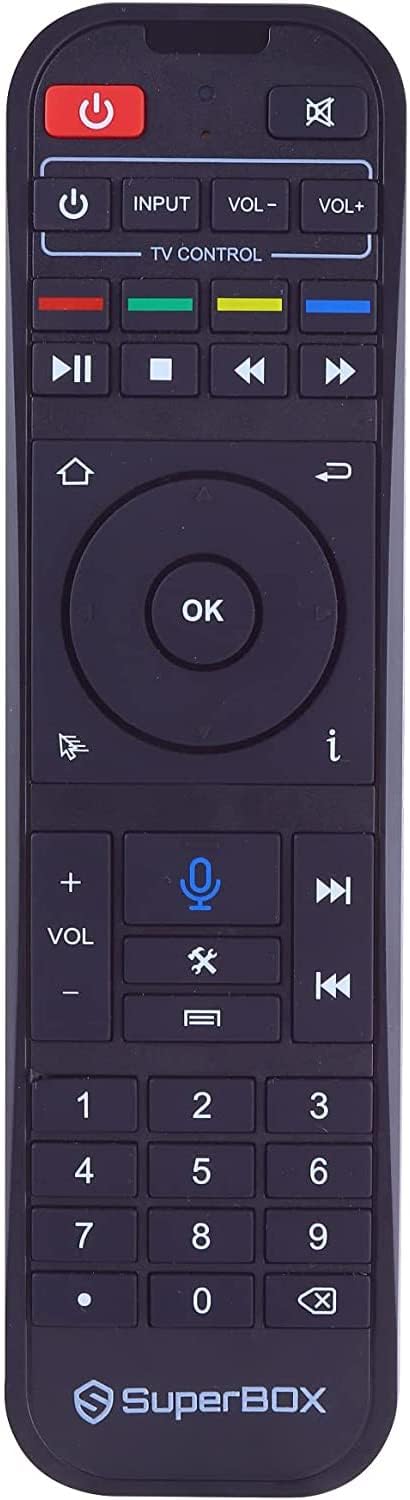
Many streaming devices, including those that utilize similar operating systems to the Superbox, offer dedicated smartphone apps that can function as remotes. These apps leverage your Wi-Fi network to communicate with the device.
- Pros: Free or very low cost, convenient if your phone is always within reach, often offer keyboard input for easier searching.
- Cons: Requires your smartphone to be on and connected to the same network, can drain phone battery, less tactile feedback than a physical remote.
- Examples: While a direct “Superbox” app might not exist for all regions or models, many Android-based streaming devices have companion apps. If your Superbox runs on a recognizable OS like Android TV, searching for that specific OS’s remote app might yield results.
3. Third-Party Remotes Designed for Specific Operating Systems

Some manufacturers specialize in creating remotes tailored for popular operating systems that Superbox devices might run on, such as Android TV or a customized version of it. These remotes often aim to enhance the user experience with additional buttons or improved ergonomics.
- Pros: Often designed with the OS in mind, potentially offering better integration and functionality.
- Cons: Compatibility can be hit-or-miss depending on the specific Superbox model and its underlying software.
- Examples: Search for “Android TV remote” or “streaming box remote” on e-commerce platforms, paying close attention to product descriptions for compatibility.
4. Game Controllers
For a more interactive experience, especially when gaming or navigating certain apps, a game controller can serve as an unconventional but effective remote alternative.
- Pros: Excellent for gaming and some navigation, can offer a fun and engaging experience.
- Cons: Not ideal for all functions (e.g., text input), can be overkill for simple media playback.
- Examples: Xbox Wireless Controller, PlayStation DualShock Controller (often require Bluetooth adapters or specific compatibility).
Key Features to Look For in a Superbox Remote Alternative
When evaluating potential Superbox remote alternatives, consider these crucial features:
- Compatibility: This is paramount. Ensure the remote explicitly states compatibility with your specific Superbox model or the operating system it runs on. Check online forums and reviews for user experiences.
- Control Type: Does it use Infrared (IR), Bluetooth, or Wi-Fi? Bluetooth and Wi-Fi generally offer better range and don’t require direct line-of-sight like IR.
- Ergonomics and Design: How does it feel in your hand? Are the buttons well-placed and easy to press?
- Programmable Buttons: The ability to assign custom functions to buttons can significantly enhance convenience.
- Voice Control: If voice search and control are important to you, ensure the remote supports this feature, either natively or through integration with a virtual assistant.
- Backlighting: For late-night viewing, backlit buttons are a game-changer.
- Battery Life: Consider the type of batteries it uses and their expected lifespan.
- Ease of Setup: Some remotes are plug-and-play, while others require more involved programming.
Troubleshooting Common Issues with Alternatives
Even with the best intentions, you might encounter issues when using an alternative remote. Here are some common problems and their solutions:
- No Response:
- Ensure the remote is properly paired or programmed with your Superbox.
- Check the batteries and replace them if necessary.
- If using IR, ensure there’s a clear line of sight between the remote and the device.
- Restart your Superbox.
- Inconsistent Performance:
- For Bluetooth remotes, ensure there are no obstructions between the remote and the device.
- Minimize interference from other wireless devices.
- Update the firmware of the remote if an update is available.
- Missing Functionality:
- Double-check the remote’s specifications to confirm it supports the desired functions.
- Consult the remote’s manual or the manufacturer’s website for programming instructions.
- Consider if a different type of remote might be a better fit for your needs.
Statistics and Market Trends

The demand for versatile and user-friendly remote control solutions is on the rise. Market research indicates a growing preference for universal remotes that consolidate multiple devices. A report by Statista in 2023 projected the global smart home market, which includes smart remote controls, to reach over $200 billion by 2027, highlighting the increasing adoption of such technologies.
Furthermore, consumer reviews consistently highlight ease of use and comprehensive compatibility as the most critical factors when choosing a remote. This underscores the importance of thorough research and understanding your specific needs before making a purchase.
Finding Your Perfect Remote Match

Navigating the world of Superbox remote alternatives might seem daunting at first, but with a clear understanding of your options and priorities, you can find a solution that enhances your entertainment experience. Whether you opt for the versatility of a universal remote, the convenience of a smartphone app, or a specialized third-party controller, the key lies in ensuring compatibility, desired features, and ease of use. By carefully considering the factors discussed in this guide, you can move beyond the limitations of your original remote and unlock a more seamless and enjoyable way to interact with your Superbox and your entire home entertainment system.